

How to Fix, Structure, and Use Linktree as a Long-Term Business Asset
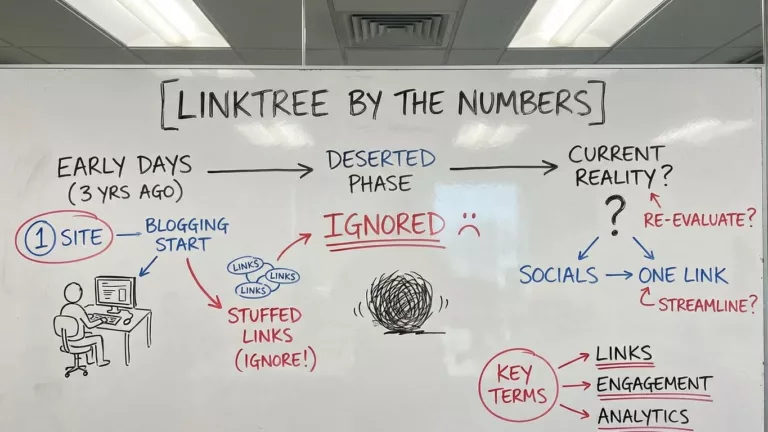
Is Linktr.ee one of those things that you said, “Okay, I’ll try it” when it first came out, stuffed a bunch of links on it, and have ignored it ever since? That was me. At the time, I had one site, just started blogging for myself, and put my name on all of the socials. Three years ago. It became deserted.
Fast forward to today, I have 6 websites that push content to all of the socials: X, Instagram, Facebook, Pinterest, YouTube, and Medium. My Linktree evolved into a mishmash of 20 disconnected links. Linktree was initially created because most socials allow one link in your bio. That created a need that still exists today. This post will walk you through the proper setup so that when a person lands on your Linktree bio, they can easily get a total sense of who you are and what you do.
This post is written for a person with multiple sites and profiles. There will be another post to optimize the Linktree Shop. It contains all of the details that you will need to become a Shop power user.
Why Niche Bloggers Struggle With Traffic (Even When Their Content Is Good)
Blogging these days calls for more than crafting long, thoughtful posts. Social platforms like Instagram, TikTok, and X (Twitter) want you to stick around on their turf. That’s why so many platforms only allow a single main “link in bio.” This is tough when you have offers, guides, and evergreen blog posts to share. Many bloggers I know—myself included—have poured hours into making great content, only for it to sit invisible unless you guide readers properly.
The problem isn’t a lack of E-E-A-T or lived-in experience. What really slows traffic is poor routing. If all you do is drop one link to your website’s homepage or the most recent post on your social outlets, you are sending people to different places, and they do not get a real sense of where to go next. In the old days, your thinking was “just add a link,” which worked when audiences were less distracted. Now, readers expect more information and direction.
What Is Linktr.ee, and What It Is Not
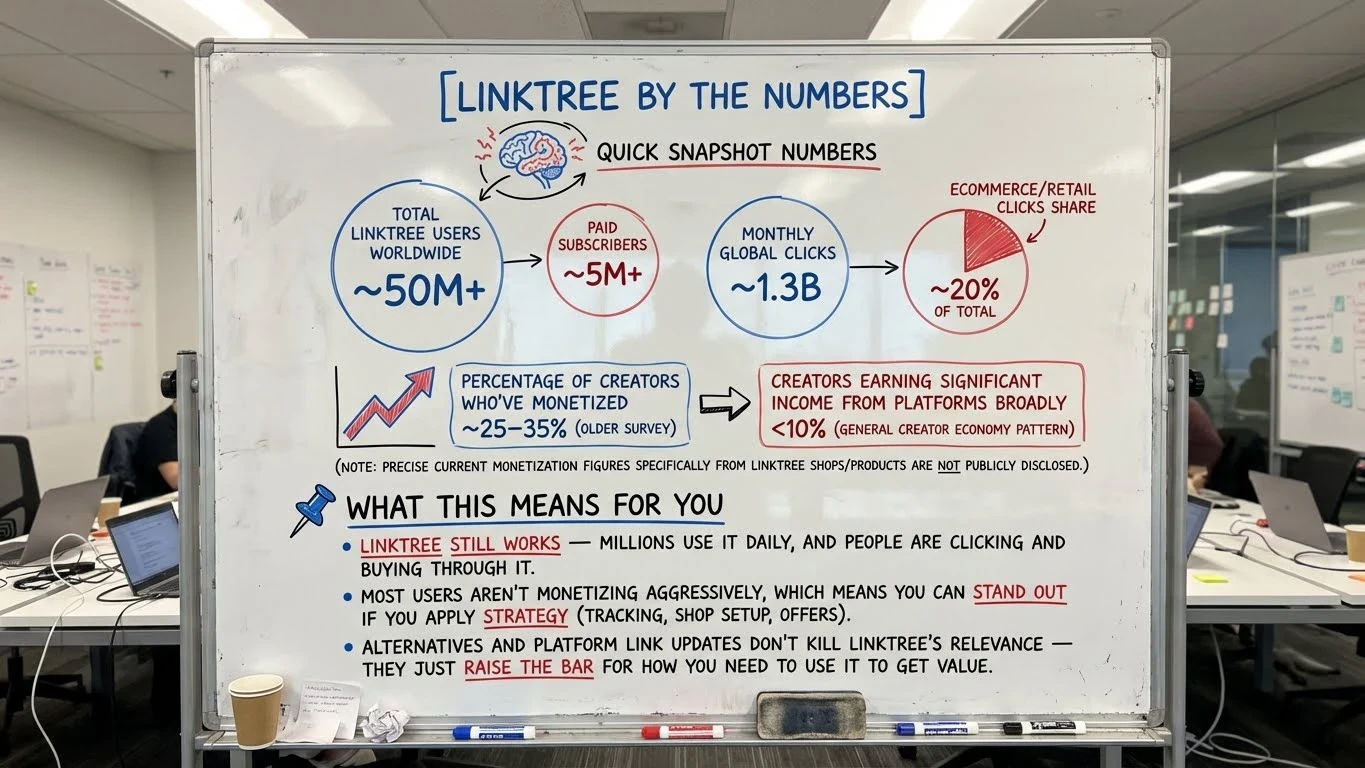
Linktr.ee, often called Linktree, is a landing page that gathers up all the links you want to share in your Instagram link in bio, TikTok profile, or Twitter bio. It gives you a single, easy-to-remember URL that points people to your featured posts, affiliate offers, email signups, or anything else you want to show off.
But a Linktree is NOT your website.
It won’t replace a blog or give you all of the analytics by itself. But what it does help with is
- Link-level CTR
- View vs click ratios
- Geographic data
- Referrer insights
- Commerce performance (Shop, Earn links)
- A/B testing (paid tiers)
Unlike a true sales funnel, it doesn’t guide readers through steps automatically. You need to map out that path yourself.
Linktree does not automate funnels. But it absolutely supports manual funnel architecture.
Power users:
- Pin a single primary CTA
- Use Shops as mid-funnel monetization
- Use Forms for lead capture
- Use link sequencing (above/below fold logic)
- Rotate links based on campaigns
Many beginners use Linktree as a random list for every possible link, leaving readers confused. This is leading most Linktree users to fail because:
- No hierarchy
- No intent grouping
- No primary action
- No audience awareness
- No campaign rotation
This user error is a result of their success.
Linktree Was Adopted Faster Than It Was Understood
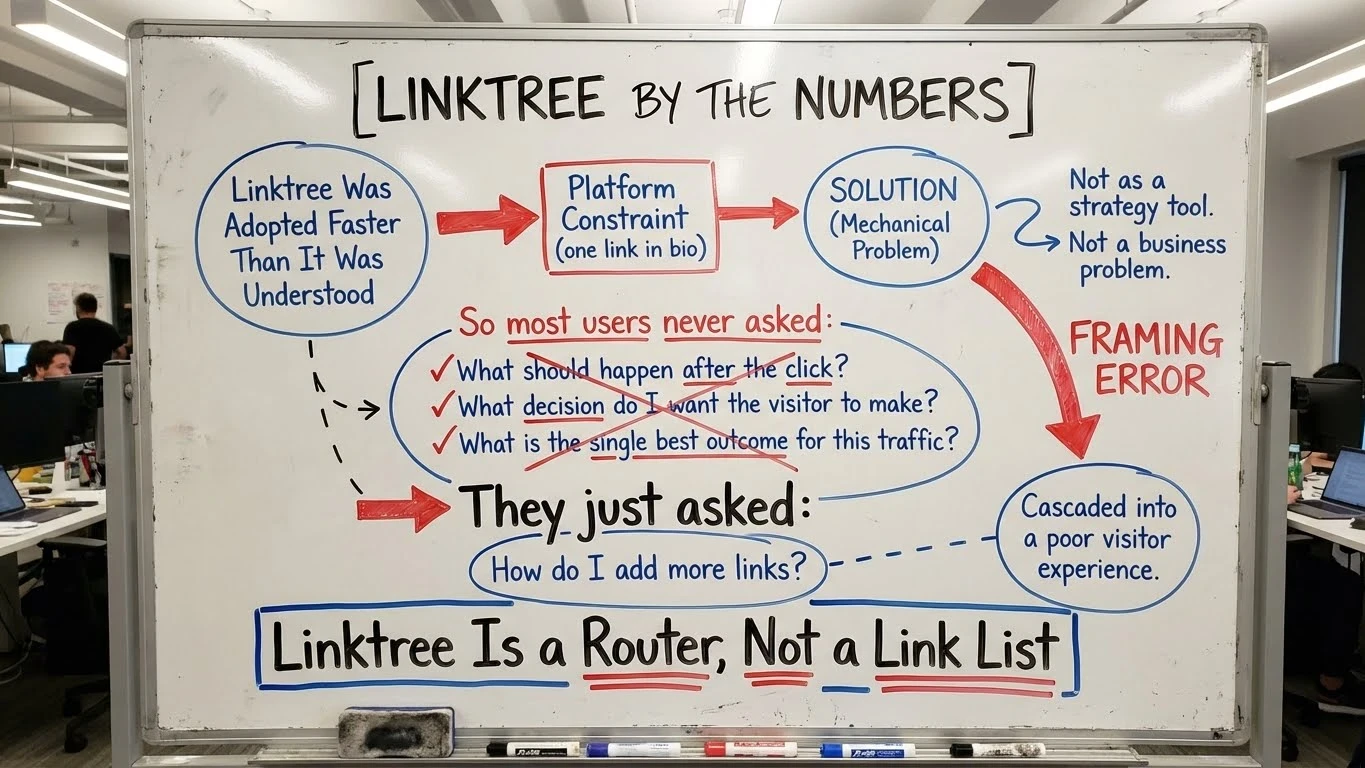
Linktree spread virally as a solution to a platform constraint (one link in bio), not as a strategy tool.
People adopted it to solve a mechanical problem, not a business problem.
So most users never asked:
- What should happen after the click?
- What decision do I want the visitor to make?
- What is the single best outcome for this traffic?
They just asked:
- How do I add more links?
That framing error cascaded into a poor visitor experience.
Linktree Is a Router, Not a Link List
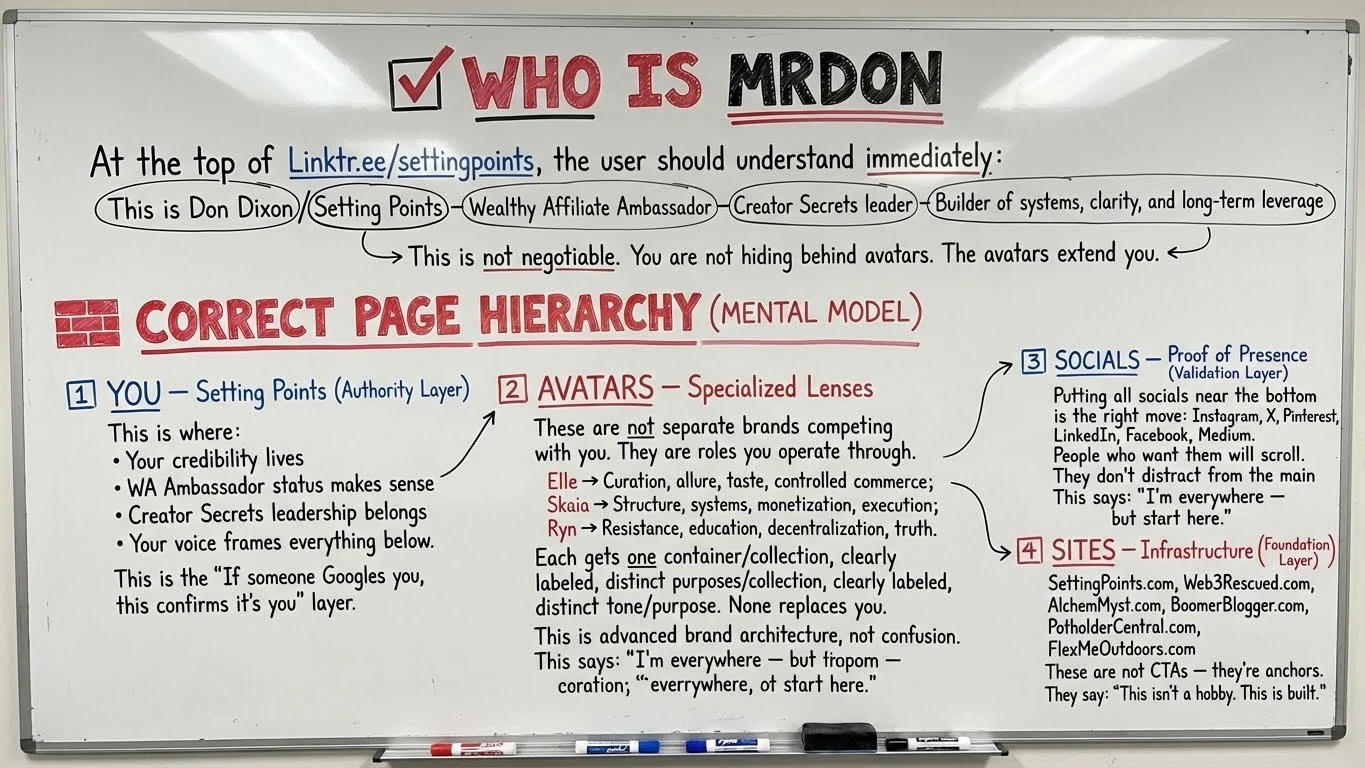
Let’s break the first bad habit. Linktree for bloggers isn’t just about how many links you can toss in. I have 20+ links in mine. The difference between you and me? I offer my visitors a clear understanding of who I am. When a person is on Elle’s Instagram page and clicks the link in bio, they are taken to Elle’s section. I control that. This keeps things clear, neat, and organized.
Niche bloggers build trust faster this way, because we serve specific interests, not just what’s popular for the week. This is totally different from how influencers hop from one trend to another using Linktree for sponsors or whatever’s hot.
How Serious Creators Structure Linktree
The most successful independent creators I follow treat their Linktree with the same attention they give to their main site’s homepage. Rather than listing recent posts, they organize links by visitor intent. For instance, they’ll have a top link for “Start Here,” clear directions for new subscribers, and a focus on the most helpful evergreen guide, not just whatever’s been posted recently. They keep identity links (like About, Proof, Press Mentions) separate from money links (like affiliate offers or ebooks). Their Linktree pages rarely change week to week; who they are wins over chasing hot trends. When Linktree is treated as a key piece of your system, not just a casual add-on, every click matters more.
A Simple Linktree Framework for Niche Bloggers (That Scales)

I’ve tested a ton of setups and found the best approach is to build your Linktree around a few simple layers. Here’s my go-to model:
- Authority Layer: Who you are, your blog or business name, and a short value statement.
- This helps visitors spot your expertise right away
- Content / Education Layer: Top guides, how-tos, or your blog’s main theme.
- These answer your audience’s most common questions or problems quickly
- Monetization Layer: Recommended tools (like Wealthy Affiliate or WordPress plugins), affiliate offers, or free lead magnets for email marketing.
- Place these after you provide value
- Proof Layer: Social badges, testimonials, awards, or external guest posts that make your authority pop
This setup keeps your Linktree page clean, makes it easy for new visitors to get a sense of what you do, and steers them toward actions that matter—not just random choices.
Common Linktr.ee Mistakes That Kill Clicks and Trust
Mistakes are common when you are first setting up links for niche blogging. Here are the top mistakes I see over and over:
- Adding too many links without a clear order. People get overwhelmed and bounce fast
- Mixing audiences that don’t align (like Blogging Skills with Decentralized Digital Identification). This waters down your message and loses trust
- Putting sales or affiliate links first, before offering value or context. This looks too salesy
- Treating Linktree as a dumping ground for every link you have. This crowds out your core message and makes things messy
- Changing links and priorities too often. Consistency helps visitors know what to expect and builds trust for those who come back
I always remind myself: organized, clear links work way better than a scattered list.
Linktree vs Website: Why You Need Both (And When to Use Each)

This comes up a lot: Should I bother with Linktree if I already have a WordPress site? Will it mess with my SEO? Can Linktree replace my website?
Here’s what I’ve picked up after a lot of time researching:
- Linktree is for routing: It directs people to the best content or offers for what they want right then
- Your blog or website is for depth: This is where you dig into details, answer big questions, and showcase your best work for the long term
- Email is for ownership: Your email list is the only channel you truly control. Use Linktree to nudge readers into signing up early and often
Linktree doesn’t directly hurt your SEO. But don’t skip having your own site. The smart way is to use Linktree to send “top of funnel” visitors to your best blog content, lead magnets, or info pages. For more control, you can even link out from Linktree to a branded landing page that tracks clicks with better analytics.
How Linktr.ee Fits Into a Long-Term Blogging Game Plan
If you’ve been blogging since RSS feeds were big (like I have), you know trends come and go fast. What always lasts is patience and good systems. Viral moments are rare, but clear and consistent routing pays off over time. A solid Linktree page becomes your anchor across all your social channels, so you don’t have to keep rebuilding every few months. As your search rankings go up or new offers roll in, update that single bio link, and you’re good. Linktree supports your blog’s traffic by working as a reliable switchboard that adapts with you. The key is treating it as a semi-permanent asset, not a throwaway experiment.
Who Should Use Linktree for Niche Blogging (And Who Shouldn’t)
From what I’ve observed, certain groups get the most out of Linktree for bloggers:
- Niche content creators with multiple key resources to steer visitors toward
- Affiliate marketers who want to put the spotlight on different offers for different audiences
- Educators or info product sellers using several channels to connect
- Anyone setting up a system that guides, not just grabs attention
Why Linktree Doesn’t Help Viral Chasers
Linktree does nothing to create demand. It only routes existing attention.
Viral chasers rely on:
- Spikes of attention
- One-off posts
- Trend alignment
- Temporary curiosity
That kind of traffic has no follow-through intent.
When someone clicks a Linktree after a viral post, they are usually asking:
- “Who is this?”
- “Is there more of this exact thing?”
If the answer isn’t obvious within seconds, they leave.
Here is Your “Fix Your Linktree” Sequence
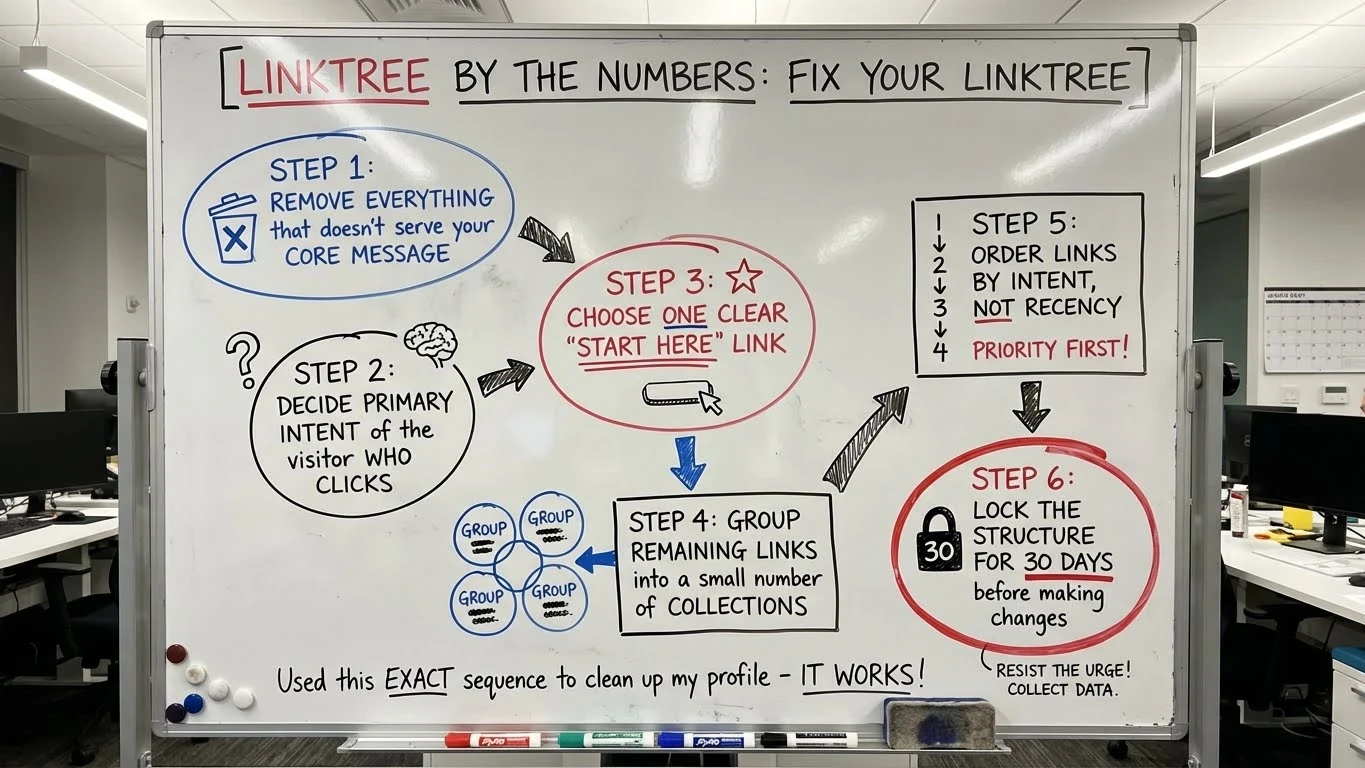
This lays out what makes a strong Linktree router for your business. But if you already set one up years ago, stuffed it with links, and walked away, you’re not alone. That was me. The fix isn’t starting over. It’s restructuring with intent.
Here’s the exact “Fix Your Linktree” sequence I just used to clean up my own profile before writing this guide:
Step 1: Remove everything that doesn’t serve your core message
Step 2: Decide the primary intent of the visitor who clicks
Step 3: Choose one clear “Start Here” link
Step 4: Group remaining links into a small number of collections
Step 5: Order links by intent, not recency
Step 6: Lock the structure for 30 days before making changes
Once my Linktree was rebuilt this way, everything else got easier. Routing made sense. Trust improved. And the page finally supported the business instead of cluttering it. That’s Phase One.
Phase Two is monetization — using Linktree intentionally as a revenue layer, not just a directory. That’s where the next post begins.
Bottom line: Linktree is a mirror of your clarity. I didn’t write this after theorizing or researching. I wrote it because I just rebuilt mine and recognized the same failure pattern everywhere else. Fix the structure first. Then make it work for you.